Built for nonprofit and partnership professionals managing real pipelines

Every prospect, every stage,
one board.

Every partnership, one board.
AI powered by Claude

Spreadsheets don't tell you who's gone quiet or what to say next. Partner Momentum tracks every donor and partner prospect on a visual pipeline, flags what needs attention, and drafts the outreach for you.

Launch the app → See how it works
See your whole pipeline

Seven stages, one board, no guessing where anyone stands.

Identified, Cultivating, Proposal Sent, Negotiating, Committed, Stewarding, Declined. Drag a card between stages or use the Move menu. Every card shows the org, contact, ask type, and priority at a glance.
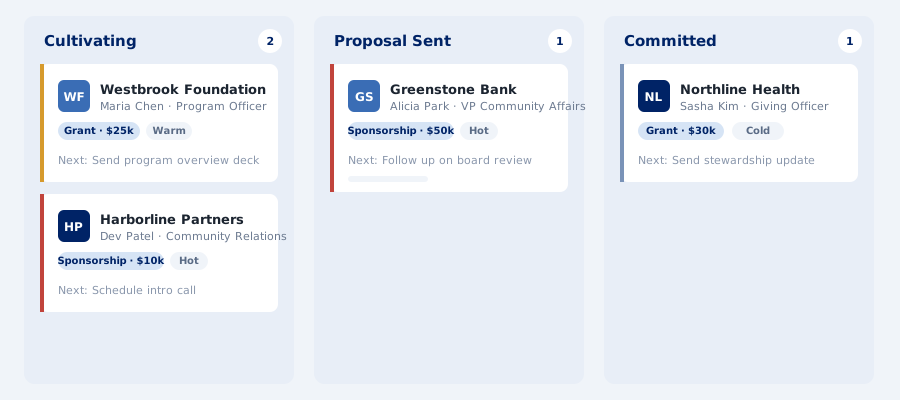
Partner Momentum board view showing prospect cards across pipeline stages
Never guess what to say

AI-drafted next steps, outreach, and fit scores.

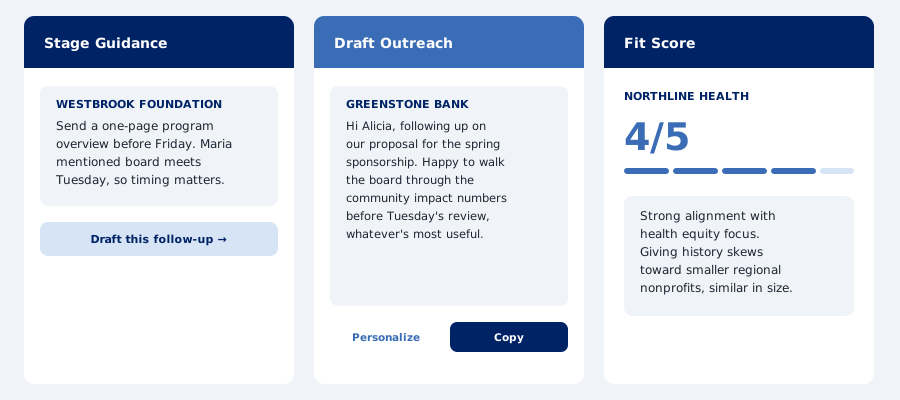
Three AI features work from a prospect's notes and current stage: Stage Guidance suggests a concrete next move, Draft Outreach writes a warm, specific message, and Fit Score rates how well a prospect matches your mission or ask.

Partner Momentum AI Assist panel showing Stage Guidance, Draft Outreach, and Fit Score
Nothing gets lost

Declined prospects archive themselves after 30 days.

A card that's been sitting in Declined for a month moves automatically to your Archive tab, keeping the board focused on what's actually active, without losing the history.

Who it's for

Built for people managing real relationships, not enterprise CRM budgets.

Partner Momentum is for development directors tracking major donors, partnerships managers building corporate sponsorships, and small nonprofit teams who've outgrown a spreadsheet but can't justify Salesforce.

What they have in common: a pipeline of real people and organizations at different stages of a relationship, and a need to know exactly who needs attention this week.

How it works

Takes about 10 minutes to set up. Nothing to install.

Partner Momentum connects to a Google Sheet you control. Your data never touches our servers. Setup requires a desktop or laptop — Google Sheets extensions are not available on mobile or tablet.

1

Create a Google Sheet

Go to sheets.google.com, create a blank spreadsheet, and set up a Pipeline tab and an Archive tab.

2

Add the Apps Script

Paste a small script that bridges the app and your sheet. Follow the full setup guide: Mac or Windows.

3

Connect and go

Paste your Web App URL. Then add your AI API key to unlock Stage Guidance, Draft Outreach, and Fit Score. Partner Momentum works with Anthropic (Claude) by default. Prefer OpenAI? You can use your own OpenAI API key instead. Get one at platform.openai.com. The API is a separate product from Claude.ai and ChatGPT. It is billed per use regardless of any existing subscription.

4

Add your first prospect

Drop them into Identified and start moving them through the pipeline.

FAQ

Common questions.

Does Partner Momentum cost anything?

The app itself has no subscription, no account, and no data stored on our servers. Your pipeline lives in your own Google Sheet. AI features require your own API key and are billed per use directly by your provider, either Anthropic or OpenAI. For light use, costs are minimal, typically a few cents a month.

Do I need an AI API key?

Only if you want Stage Guidance, Draft Outreach, or Fit Score. Without a key, the rest of the app (the board, cards, and notes) works just fine.

Which AI providers does Partner Momentum support?

Partner Momentum is built with Anthropic's Claude as the default AI provider. If you already have an OpenAI account and prefer to use that instead, you can use your own OpenAI API key. Either way, you connect your key directly inside the app.

What happens to Declined prospects?

They stay visible on the board until 30 days have passed since they were marked Declined, then they move automatically to a separate Archive tab in your sheet. Nothing is deleted.

Is my data private?

Yes. Your pipeline data never touches our servers. Everything is stored in a Google Sheet you own and control. The only external calls made are to whichever AI provider you've connected, using your own API key.

Takes about 10 minutes to set up. Nothing to install.

No account required. No data stored on our servers. Setup requires a desktop or laptop. AI features use your own API key, billed per use by your provider. Your pipeline stays in your own Google Sheet.

Set up on Mac → Set up on Windows →

Already set up? Launch the app →